
If your income has changed this year, there's a good chance you're either overpaying your monthly social security contribution - or underpaying, which could mean an unexpected bill when the annual regularisation comes around. The real-income contribution system allows you to adjust your bracket up to 6 times per year. Here's how to do it correctly. For more information, check out this video on our YouTube channel.
Since 2023, self-employed workers (autónomos) in Spain contribute to Social Security based on their actual net income, not a freely chosen fixed base. The Social Security system divides income into brackets, each with a corresponding monthly contribution.
2026 Bracket Table:

Check out our YouTube channel; in this video we guide you step by step through the entire process of registering in Social Security. And for more information about the contribution brackets, check out this video also.
You can modify your contribution base up to 6 times per year, within the following deadlines:
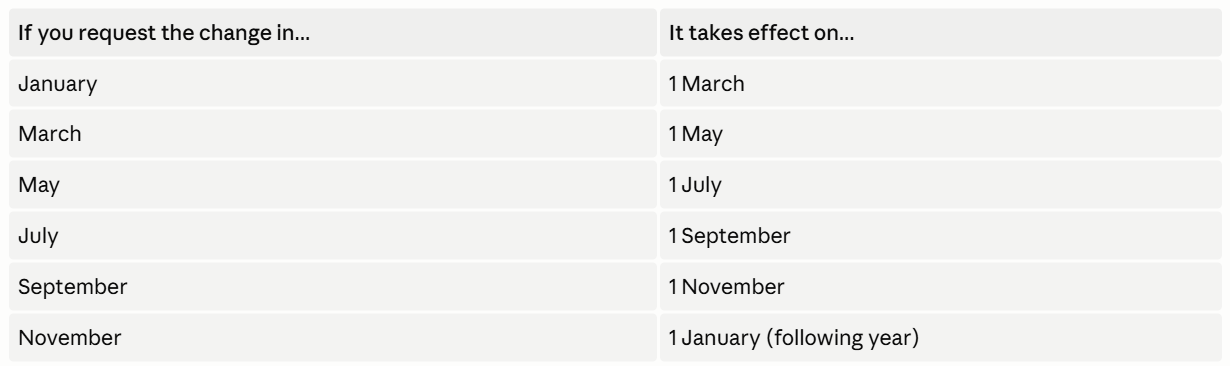
Your bracket is calculated based on your net income, which is:
revenue -deductible expenses - 7% hard-to-justify expenses = net income
Divide the annual result by 12 to get your monthly net income, then match it to the table above.
Practical example:
Consult the complete table of income brackets based on actual income.
At the end of the tax year, Social Security runs an annual regularisation. If you've been contributing below your actual bracket, you'll receive a bill for the difference. If you've overpaid, you'll get a refund - but that money will have been sitting with the government all year, unavailable to you.
Adjusting your bracket during the year simply means paying what you actually owe - no more, no less.
Not yet registered as self-employed? Here's the complete guide.